Running CubeMagic
Everyday data input, edit and calculation of the optimal arrangement
-
Explaine everyday data input, edit and calculation of the optimal arrangement by the Cube Magic packing editor.
- Data input
-
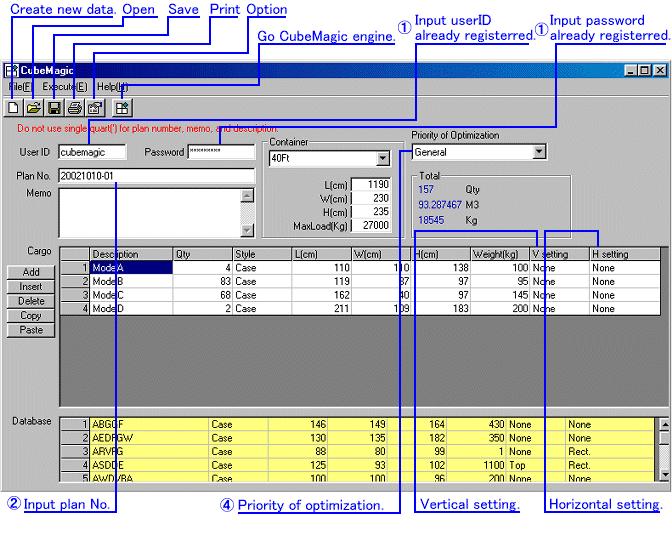
- Input the user ID and the password which registered.
Although trial by Guest can also be performed, calculable data has restriction.
- Use Plan No freely for discernment of a plan. (Ex) Date + calculation number -> 97112001
- Use Memo freely for customer name, the destination, etc.
- Chose the kind of container or input L-W-H-MaxLoad of a container.
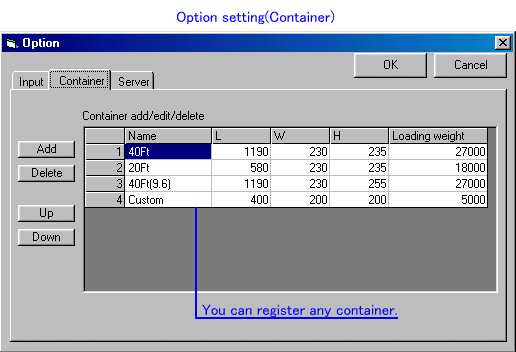
You can register a container freely by option setup. A track and a palette are also O.K.
- Set up optimization priority conditions if needed. However, it may seldom change depending on a case.
- Input of a cargo table
Description Name Qty Number (default:1) Style Style:Bare(nakedness)/Skid(palette)/Carton(corrugated paper)/Crate(wooden frame)/Case (wooden box) L^W^H^Weight Length / width / height / packing weight (a decimal point cannot be used) Vertical setting It specifies, only when adding restriction to vertical arrangement.
Usually [None]Horizontal setting Only when required, it specifies. (when uniting in the direction of a nail of a forklift etc.)
Usually [None] V/parallel is the direction of the long side of the cargo to the long side of a container.- Chose a cell and input data.
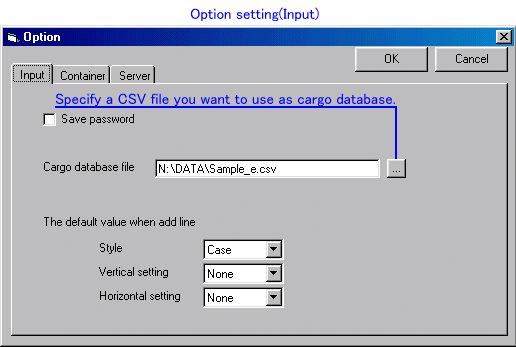
Description cell, the cargo name which starts in the inputted character is automatically searched from a database, and is displayed on a database table. Chose cargo and double-clicks or [Return], the data will be copied to a cargo table. A database file is chosen by option setup. Please make a database file according to explanation of a format of a cargo database. - Move to the following cell by [Enter].
- Please double-click a cell, in order to change the contents of an inputted cell.
- Move between cells by [Arrow key].
Move to a cargo database with [Tab key]. Keep in mind that does not move between cells.
- The default of style / Vertical setting / Horizontal setting can be changed by option setup.
- Chose a cell and input data.
- Input the user ID and the password which registered.
Although trial by Guest can also be performed, calculable data has restriction.
- Calculation of the optimal arrangement
-
If the Cube Magic button at the upper right of a screen is clicked after inputting data,
the Cube Magic engine on server of our company will start, and the optimal arrangement will be calculated.
After calculation is completed, a Cube Magic viewer starts and a product container plan is displayed.
- New creation button
-
The present data is cleared. Sample data is set when user ID is Guest.
- Open button
-
Read the data of the Cube Magic packing editor saved on the disk.
- Save button
-
Save present data to a disk
- Print button
-
print a cargo table.
- Option setting button
-
Various items, such as preservation of a password,
selection of a database, change of a default,
and registration of a container, are set up.
The contents of a setting are saved on a disk and it becomes effective next time also at the time of starting.